<------------- PS : Readers must read the note at the end ------------------->
Hey friends, here in this post I'll show you how to bind 2 or more .exe files so that running the main execution file will also run your hidden execution files in background without the knowledge of user who is running it.
I am sure this will be helpful to you if you are seeking for a trick to keep your virus file inside a genuine software and make it to run when anyone installs that software.
There are many binder software available like filejoiners, file binders etc. I dont know how many of you are aware of this great windows tool. Even I was in search for those softwares to keep my virus files hidden untill I realize that there is an inbuilt windows .exe binder which can bind the files more effectievely than others. Also a great advantage that if you bind in this way the possibilities of being FUD (Fully Undetectable) is very high as it uses genuine windows tools. I will give you step by step explanation for binding 2 .exe files to a single package. Have you heard about IExpress anywhere before? If not just keep in mind that it is the inbuilt tool in windows used for binding .exe files.
Steps:
1) Open run (windows + R)
2) Type iexpress and hit Enter
This will open some thing like this,
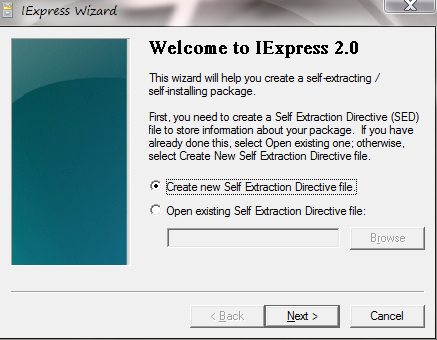
Do as shown in the screenshot above.
Select "Create new Self Extraction Directive file" and click Next.
3) Give a title for your package.

4) If you have give any message, it will be prompted before the user installs the package. Suppose if I give a message "For security reason please disable your antivirus". This will be shown to the user when he/she installs the particular package. Here, in this screenshot I have selected "No prompt".
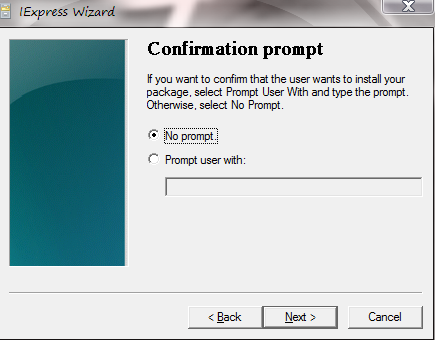
5) Select as shown below (recommended).
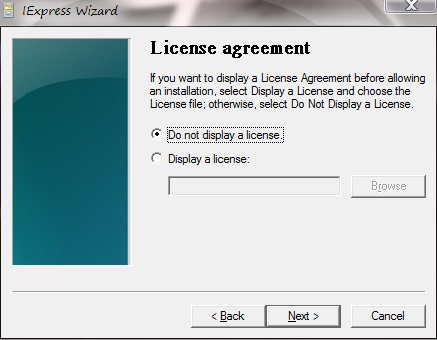
6) Now, click on "Add" button and select the files you want to bind. Here, I selected a genuine software and a virus file created by me and bind them together. So, when any user would install this particular software, user observe that the software is installing as usual, but he cannot see that a virus file has also been installed along with the software.
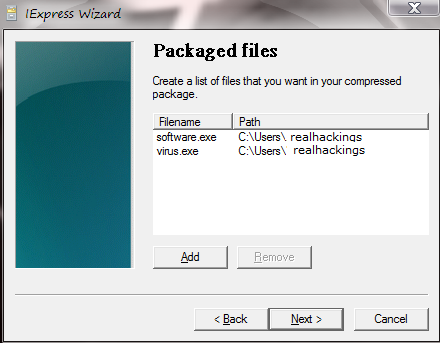
7) After clicking on "Next", there will appear 2 options i.e. Install program and Post install program. Just select the files as shown below (either way will also work) and click next.
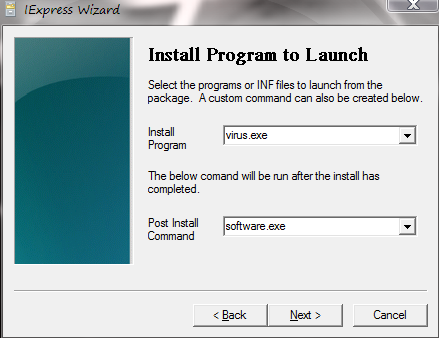
8) Select as shown below.
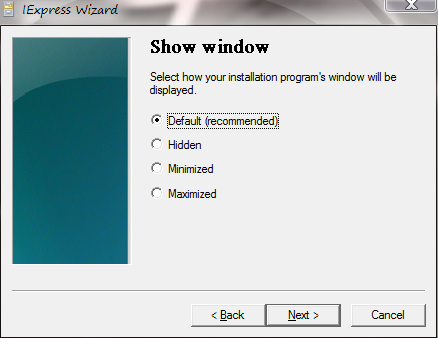
9) Mention any path of your Hard Drive (this is where your newly created file would get stored) and tick the "Hide File...." option (highly recommended).
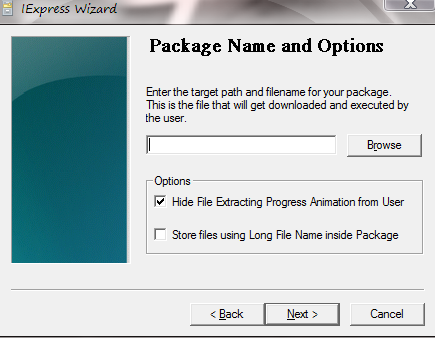
10) Select as shown below and click next.
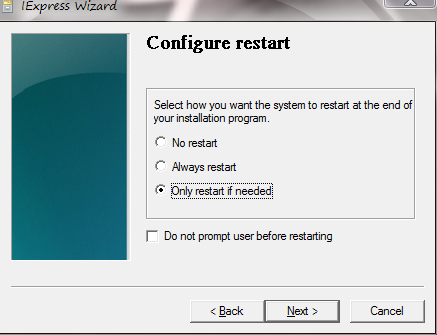
11) Select "Don't save" and click next.

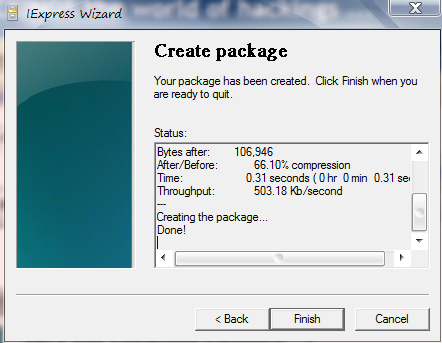
12) Click Finish and you're done.
NOTE: Binding techniques are mostly used to attach keyloggers, that will spy your each and every activity performed on your computer. These activity could be your bank transactions, your username and password of different login sites viz. Facebook, gmail, Bank sites etc. Hence this a request to all, not to download any kind of software from unknown websites, because most of the cracked softwares are attached with keyloggers that you can't detect easily.
So, be alert and download softwares from authorized and trusted websites only.
Thanks,
Parag
Goto Start --> Run --> Type the Command --> Press Enter


Using these commands, make you operate your Computer in a easier way...!!
My Computer
... (3 or more DOTS)
Documents and Settings
.. (2 DOTS)
Documents and Settings\Username
. (1 DOT)
Accessibility Controls
access.cpl
Add Hardware Wizard
hdwwiz.cpl
Add/Remove Programs
appwiz.cpl
Administrative Tools
control admintools
Automatic Updates
wuaucpl.cpl
Bluetooth Transfer Wizard
fsquirt
Calculator
calc
Certificate Manager
certmgr.msc
Character Map
charmap
Check Disk Utility
chkdsk
Clipboard Viewer
clipbrd
Command Prompt
cmd
Component Services
dcomcnfg
Computer Management
compmgmt.msc
Date and Time Properties
timedate.cpl
DDE Shares
ddeshare
Device Manager
devmgmt.msc
Direct X Control Panel (If Installed)*
directx.cpl
Direct X Troubleshooter
dxdiag
Disk Cleanup Utility
cleanmgr
Disk Defragment
dfrg.msc
Disk Management
diskmgmt.msc
Disk Partition Manager
diskpart
Display Properties
control desktop
Display Properties
desk.cpl
Display Properties (w/Appearance Tab Preselected)
control color
Dr. Watson System Troubleshooting Utility
drwtsn32
Driver Verifier Utility
verifier
Event Viewer
eventvwr.msc
File Signature Verification Tool
sigverif
Findfast
findfast.cpl
Folders Properties
control folders
Fonts
control fonts
Fonts Folder
fonts
Free Cell Card Game
freecell
Game Controllers
joy.cpl
Group Policy Editor (XP Prof)
gpedit.msc
Hearts Card Game
mshearts
Iexpress Wizard
iexpress
Indexing Service
ciadv.msc
Internet Properties
inetcpl.cpl
IP Configuration (Display Connection Configuration)
ipconfig /all
IP Configuration (Display DNS Cache Contents) ipconfig /displaydns
IP Configuration (Delete DNS Cache Contents) ipconfig /flushdns
IP Configuration (Release All Connections) ipconfig /release
IP Configuration (Renew All Connections) ipconfig /renew
IP Configuration (Refreshes DHCP & Re-Registers DNS) ipconfig /registerdns
IP Configuration (Display DHCP Class ID) ipconfig /showclassid
IP Configuration (Modifies DHCP Class ID) ipconfig /setclassid
Java Control Panel (If Installed)
jpicpl32.cpl
Java Control Panel (If Installed)
javaws
Keyboard Properties
control keyboard
Local Security Settings
secpol.msc
Local Users and Groups
lusrmgr.msc
Logs You Out Of Windows
logoff
Microsoft Chat
winchat
Minesweeper Game
winmine
Mouse Properties
control mouse
Mouse Properties
main.cpl
Network Connections
control netconnections
Network Connections
ncpa.cpl
Network Setup Wizard
netsetup.cpl
Notepad
notepad
Nview Desktop Manager (If Installed)
nvtuicpl.cpl
Object Packager
packager
ODBC Data Source Administrator
odbccp32.cpl
On Screen Keyboard
osk
Opens AC3 Filter (If Installed)
ac3filter.cpl
Password Properties
password.cpl
Performance Monitor
perfmon.msc
Performance Monitor
perfmon
Phone and Modem Options
telephon.cpl
Power Configuration
powercfg.cpl
Printers and Faxes
control printers
Printers Folder
printers
Private Character Editor
eudcedit
Quicktime (If Installed)
QuickTime.cpl
Regional Settings
intl.cpl
Registry Editor
regedit
Registry Editor
regedit32
Remote Desktop
mstsc
Removable Storage
ntmsmgr.msc
Removable Storage Operator Requests
ntmsoprq.msc
Resultant Set of Policy (XP Prof)
rsop.msc
Scanners and Cameras
sticpl.cpl
Scheduled Tasks
control schedtasks
Security Center
wscui.cpl
Services
services.msc
Shared Folders
fsmgmt.msc
Shuts Down Windows
shutdown
Sounds and Audio
mmsys.cpl
Spider Solitare Card Game
spider
SQL Client Configuration
cliconfg
System Configuration Editor
sysedit
System Configuration Utility
msconfig
System File Checker Utility (Scan Immediately) sfc /scannow
System File Checker Utility (Scan Once At Next Boot) sfc /scanonce
System File Checker Utility (Scan On Every Boot) sfc /scanboot
System File Checker Utility (Return to Default Setting) sfc /revert
System File Checker Utility (Purge File Cache) sfc /purgecache
System File Checker Utility (Set Cache Size to size x) sfc /cachesize=x
System Properties
sysdm.cpl
Task Manager
taskmgr
Telnet Client
telnet
User Account Management
nusrmgr.cpl
Utility Manager
utilman
Windows Firewall
firewall.cpl
Windows Magnifier
magnify
Windows Management Infrastructure
wmimgmt.msc
Windows System Security Tool
syskey
Windows Update Launches
wupdmgr
Windows XP Tour Wizard
tourstart
Wordpad
write
Thanks,
Parag


